


Welcome back, Spartans! We hope you had a great summer and are ready for an exciting new semester! Over the past few months, our technology vendors—like Canvas, Microsoft, and Adobe—have rolled out some great new features. The ITS Learning Technology team has been keeping track, testing, and pulling together details you need so you can start the semester confident and prepared.
Here’s what’s new (and what to remember) as we head into Fall 2025.
What’s New in Canvas
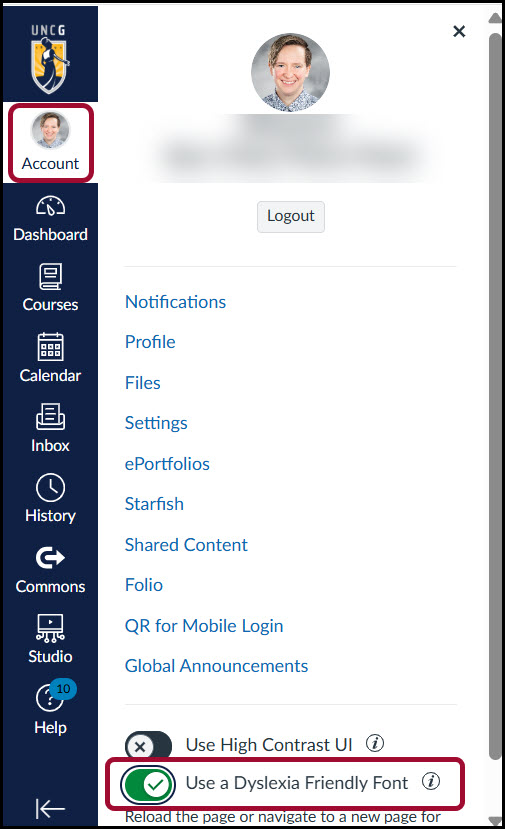
Reading just got a little easier! You can now switch to a dyslexia-friendly font in Canvas:
- Click Account on the Global Navigation.
- Toggle on Use a Dyslexia Friendly Font.
- Refresh your browser to see the change.
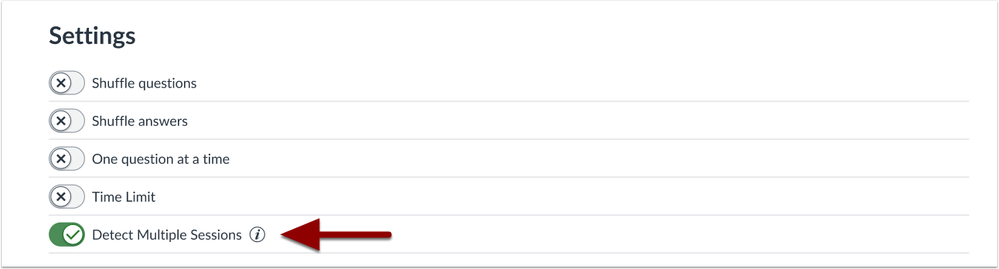
No more accidental quiz mishaps—this optional setting warns students if they try to open a quiz session in more than one window at the same time. This feature is only available for New Quiz style quizzes.
Not sure which type of quiz you’re using?
- Classic Quiz: Rocket outline icon.
- New Quiz: Solid green rocket icon.

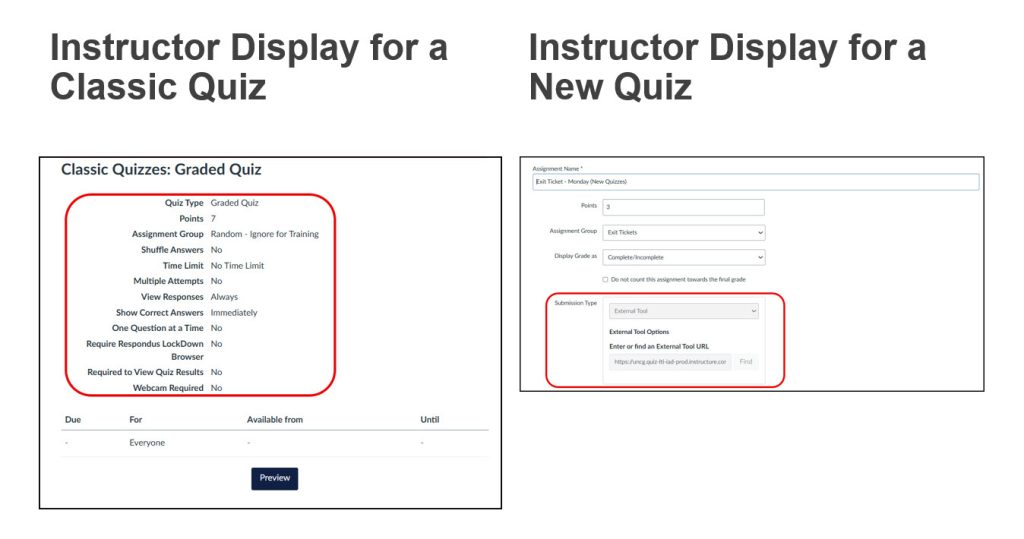
The instructor view looks different, too:
- Classic Quizzes show quiz settings.
- New Quizzes display as an external tool submission type.
Choose how you want graded discussions to display in SpeedGrader:
- Individual Posts view: See only the student’s posts you’re grading.
- Full Discussion Context view: See their posts in the full conversation (with their replies highlighted in blue).
To change this, click the Gear icon in the SpeedGrader view, select Options, and set your preferred default view.

The revamped Discussion Checkpoints feature makes it easier to keep conversations active and spread student participation across the week.
With checkpoints, you can:
- Assign different due dates for initial posts and peer replies.
- Set separate point values for each part of the assignment.
- Give students clear expectations for when and how often to engage.
Good to know:
- Checkpoints are optional.
- They can only be enabled on graded discussions.

- Learn how to manage checkpoint settings and due dates in the Canvas Instructor Guide.
Important Reminders
Accessibility Compliance – Big Changes Ahead
New federal rules require all public-facing websites and course materials to meet accessibility standards by April 2026.
More Learning Technology News
Popular Knowledge Base Articles
- Canvas: Course Checklist – Ensuring Your Class is Student-Ready
- Schedule Class Meetings with Microsoft Teams
- Student Guide to Accessing Class Teams Meetings
- Adding First Day Complete Course Materials to Your Course Navigation
- Schedule Class Meetings with Microsoft Teams
- Best Practices for Importing Previous Course Content into New Canvas Shell
- Merging (Cross-Listing) Sections into One Canvas Shell
Need Help?
For Canvas support:
- Search the 6-TECH Knowledge Base
- Contact your Academic Technology Specialist
- Request Insructional Design Assistance at the ITS Learning Technology website
- Submit a help request at the 6-TECH Online Portal
For other tech help:
- Submit a request: 6-TECH Online Portal
- Call: 336-256-TECH (8324)
- Email: 6-TECH@uncg.edu
Stay connected—subscribe to ITS News and the UTLC Newsletter for updates and resources all semester long.
