

Microsoft will remove the Microsoft Teams Classes and Meetings tools (LTIs) from Canvas on Saturday, May 10, 2025.
These tools are currently used to schedule and access Teams meetings within Canvas. Microsoft is redesigning the integrations to provide a more streamlined experience. While this work is underway, the LTI tools will no longer be available in Canvas.
What you need to know
- Impacted users: Faculty, staff, and students using Microsoft Teams Classes and Microsoft Teams Meetings within Canvas.
- Effective date: Saturday, May 10, 2025.
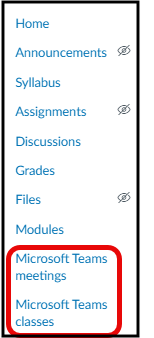
- What’s changing: The Microsoft Teams Classes and Teams Meetings integrations will be removed from the Canvas navigation bar and you can no longer schedule Teams Meetings from within Canvas.
- What to do: Faculty should schedule course meetings in the general channel of their Class Team in Microsoft Teams. Class Teams are created by turning on Microsoft Sync in your Canvas course. Step by Step instructions found in the Faculty: How to schedule class meetings in a Class Team resource.
- Support resources:
Previously scheduled class meetings will remain active. Microsoft OneDrive and Microsoft Sync integrations in Canvas are not affected. Microsoft Teams will continue to operate as normal.
Need help?
- Submit a request at 6-TECH Online
- Call 336-256-TECH (8324)
- Email 6-TECH@uncg.edu
