

UNCG previously announced that Anthropic’s Claude model was available in the paid Microsoft 365 Copilot service.
Claude Sonnet is now available in all versions of Microsoft Copilot, including the standard Copilot experience used by faculty, staff, and students.
Who is Affected?
All UNCG Faculty, staff, and students.
When Is This Available?
This feature is available now.
What is Changing?
Anthropic AI models are now available in both the standard Copilot experience and Microsoft 365 Copilot.
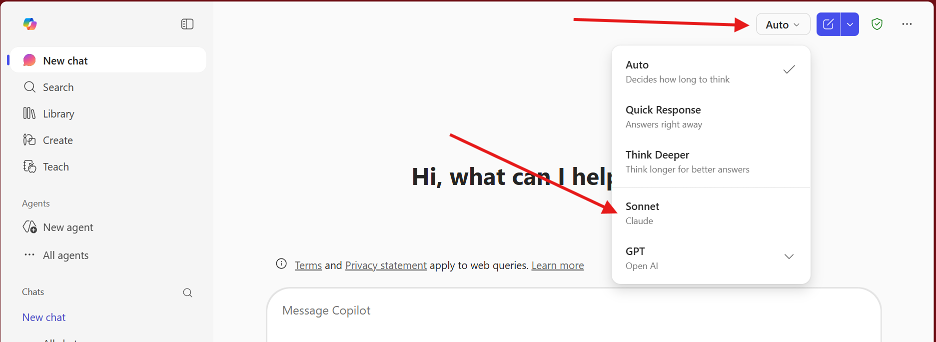
How Do I Change to the Claude Model?
Copilot automatically selects the model it believes will produce the best response based on your prompt.
If you prefer to choose the model yourself:
- Click the Auto model selector in Copilot.
- Select Sonnet to use the Claude model.
Do I Need to Do Anything?
No action is required.
Claude Sonnet is automatically available when using Copilot with your UNCG account.
What About Data Protection?
Anthropic models used in Copilot follow the same enterprise data protection standards as the OpenAI GPT models used by Microsoft.
This means:
- Your prompts and responses are not used to train Microsoft or Anthropic models.
- Enterprise data protections remain in place when using Copilot with your UNCG account.
As a reminder, do not share L3 or L4 data in Copilot, regardless of which AI model you select.
See the UNCG Data Classification Reference Chart for definitions and examples of each data classification level.
Need Help?
Find answers online or contact 6-TECH:
- Search for tech solutions: 6tech.uncg.edu
- Phone: (336) 256-TECH (8324)
- Email: 6-TECH@uncg.edu
- Submit a ticket: 6-TECH Online Portal
