

Update 10/14/25
Microsoft officially ended support for Windows 10 on Tuesday, Oct. 14, 2025.
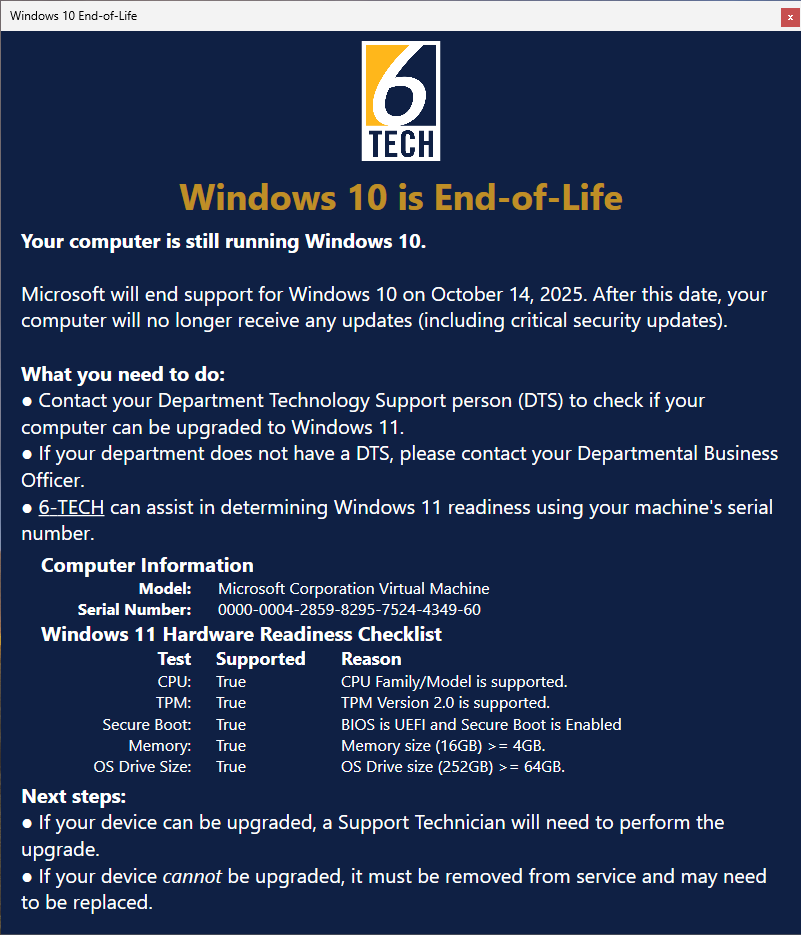
UNCG computers still running Windows 10 will now display a new pop-up alert indicating that the operating system is no longer supported. These alerts are intended to remind users that their device must be upgraded to Windows 11 or removed from service to maintain security compliance.

{Original Post: 10/2/25}
Who Is Affected?
Faculty and staff using UNCG computers that are still running Windows 10.
What’s Happening?
Pop-up alerts will appear on UNCG computers that are still running Windows 10. These alerts are intended to remind users that Microsoft will end support for Windows 10 on Tuesday, Oct. 14, 2025. After that date, Windows 10 devices will no longer receive updates—including critical security updates.

When Will This Happen?
The pop-up alerts are being deployed now and will continue to appear until affected devices are upgraded to Windows 11 or removed from service.
Why This Change?
Upgrading to Windows 11 is required to keep UNCG computers secure and supported. Microsoft’s end of support for Windows 10 means that continuing to use it would put UNCG systems and data at risk.
What Do I Need to Do?
If you see the pop-up message, follow the next steps outlined in the alert:
- Check Windows 11 readiness
- Contact your local Department Technology Support (DTS) staff.
- If your department does not have a DTS, reach out to your Departmental Business Officer.
- You may also contact 6-TECH, who can check your computer’s Windows 11 readiness using its serial number.
- Next steps after readiness check
- If your device can be upgraded, a Support Technician will complete the upgrade to Windows 11.
- If your device cannot be upgraded, it must be removed from service and may need to be replaced.
Need Help?
- Submit a request: 6-TECH Online Portal
- Call: 336-256-TECH (8324)
- Email: 6-TECH@uncg.edu
