YuJa Panorama, UNCG’s new accessibility tool in Canvas, will begin rolling out Wednesday, Oct. 14, as previously announced.
Panorama will begin processing existing course materials as it becomes available. This process may take up to 48 hours, and some features may not display as expected during that time.
Instructors should allow through Friday, Oct. 16, for Panorama to process course content and update accessibility information.
What to Expect During the Launch
As Panorama processes course materials, instructors may notice:
- Accessibility icons changing in appearance or color.
- Student-facing icons appearing temporarily instead of instructor accessibility indicators.
- Accessibility information becoming available gradually as course content is processed.
These changes may occur during initial processing and do not necessarily indicate a problem with your course or its content.
No action is needed while Panorama processes course materials. Instructors can continue to use Canvas and UDOIT during this transition.
When Processing Is Complete
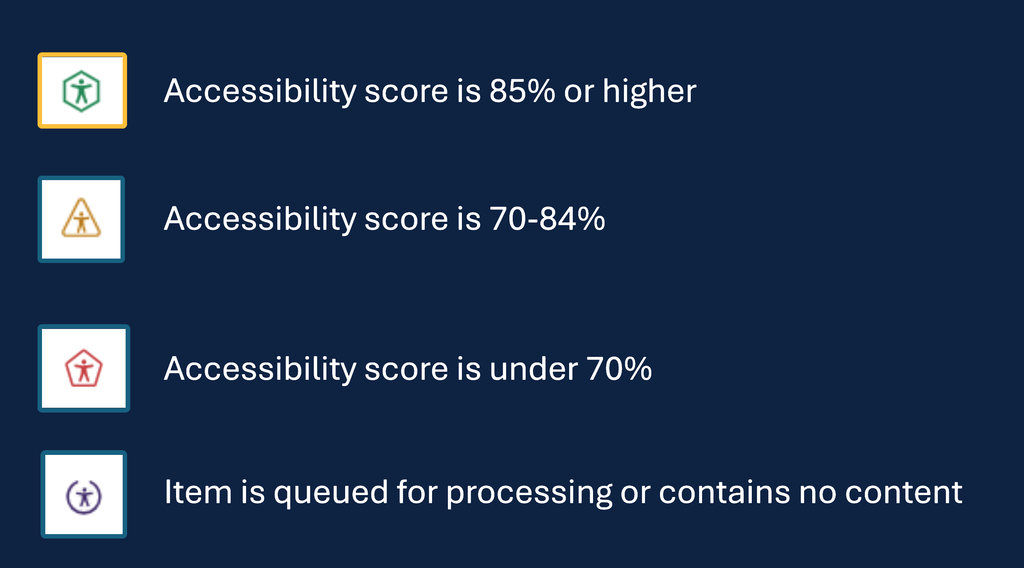
Once Panorama has processed course materials, instructors should see accessibility indicators alongside their content. These icons show accessibility scores and help identify materials that may need attention.
Accessibility scores are visible to instructors only. Students will not see these scores.
The image below shows the accessibility indicators instructors can expect to see once Panorama has finished processing their course materials.
Need Help?
If you continue seeing student-facing icons or unexpected accessibility indicators after Friday, Oct. 16, contact 6-TECH by submitting an online request for assistance or by email at 6tech@uncg.edu.
Include your Canvas course URL and a screenshot of what you are seeing to help ITS investigate.
For more information and instructions, visit go.uncg.edu/yujapanorama